Thursday, April 14, 2005

The Dog Ate it!

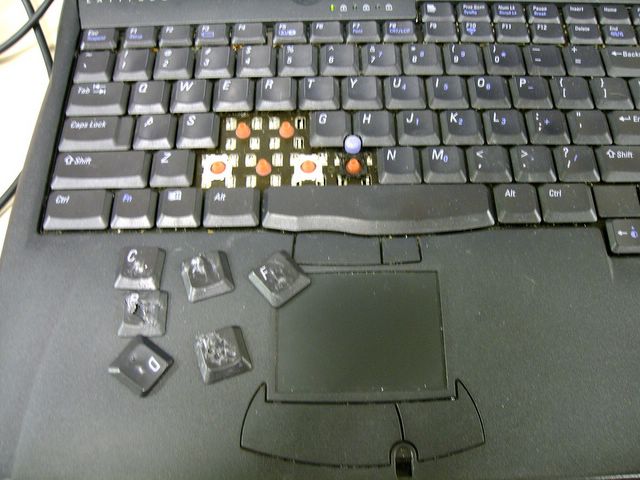
I have heard of a dog eating your homework before, but this is a new one. Now I have heard my dog ate my laptop!


The Dog Eaten Laptop Posted by Hello

Monday, April 11, 2005

Longhorn not so "long" away

Being in technology we are usually the first to try out all the cool new tools and toys and man there is nothing better. It is sometimes like Christmas to us whenever a new software or hardware product comes out and we get to get it and play with it. Ahh the chills that run up and down the spine when you complete the first install or get the new hardware in the rack, there is nothing like it. If you are not a techie, you just can’t understand what its like.

Well, this month is the beginning of “the season” for us. We start working with one of our partners Tectura partnering in the Microsoft TAP program, taking a closer look at the upcoming new Windows client operating System, codenamed “Longhorn”.

For those of you not familiar with the program, it is the granddaddy of Microsoft's beta programs; the difference is it is mainly centered on a core group of key customers and partners who are early adopters of key Microsoft technologies. It is not a replacement for their public and private beta tests, but more of a private showing or back-stage pass if you will to upcoming technology.

One of the great things about the program is that all the time and support associated with the program is free. From planning, deployment and support Microsoft pays for all of it. You can’t beat free!

TAP currently applies to Windows client, server, Office, Systems Management Server and a handful of other products.

I can’t wait to get started and to play with all the cool new tools. I know, I know, I’m a tech dork.

Friday, April 01, 2005

Point of Sale Q&A

I often get asked about how we handle Point of Sale operations at Fellowship Church, so I thought I would put together answers to the most common questions that I receive.


1. What Point of Sale system are you using?

Response: We are using the Microsoft Retail Management System for both our retail and food service stores that we have. We recently upgraded and purchased the Headquarters module which allows us to manage multiple stores from one interface.


2. Do you have multiple retail outlets, or is everything consolidated in one physical store?

Response: We currently have 3 retail stores and one food service store.


3. Do you have a single POS/inventory system for all retail sales including foodservice, merchandise, and ticket sales? Or are these separate systems?

Response: We have the one system to handle all sales of all types including ticket sales. However the system is not designed to facilitate seat assignments or ticket creation. I know that some churches like to have functionality to sell assigned seat tickets to Christmas programs and things of that nature, but we do not have that requirement.


4. How do your retail systems tie to your G/L?

Response: There is direct integration from RMS to the financial system we are using which is Great Plains. This provides PO and GL integration only. There are third party integration products available on the market that provides more extensive integration such as.

· Accounts Receivables transactions move from RMS to Great Plains
· Multiple Stores – Multiple Great Plains companies mapping
· Sales Order processing transaction integration
· Purchase Order Processing POs and Receipts integration
· Automatic new customer move from RMS to GP
· Automatic new vendor import


5. How do your retail systems tie to your web presence?

Response: RMS does have the capability to tie into your web site as well for ecommerce. We have not pursued this as of yet.


6. Do you use a touch-screen interface for any registers?

Response: Yes. For our Café we do have touch screen monitors and are using a special touch screen menu interface. RMS does provide such functionality to interact with touch screens but we needed something a little more specific to our needs so we developed a custom interface that integrates with RMS.


Overall we have been very happy with the product and it has really taken us to the next level from where we came from with the old solution we were using.

Thursday, March 24, 2005

The New Summit 400-48t

If you did not already know, our core network infrastructure is all Extreme equipment. We have recently been looking at upgrading some of our infrastructure and discovered this new switch from Extreme called the Summit 400-48t. It has a very high port density with 48 gig ports in just a 1U footprint, and a very large packet throughput. Looks like a great little switch and I hope to have my hands on one soon. Here are some of the other features:

Summit 400 Benefits

· Industry’s highest density Gigabit Ethernet for easy scalability and efficient use of rack space

· Highest performance switch fabric (160 Gbps) and throughput (101Mpps) so current and future applications have the bandwidth required

· Two 10 Gigabit Ethernet ports to avoid the common uplink bottleneck

· Modular 10 Gigabit Ethernet design that can be quickly upgraded in the field so you only pay for the bandwidth you need, when you need it Advanced Layer 3 intelligence to roll out new

· Advanced Layer 3 intelligence to roll out new services quickly and easily;

· Comprehensive security services to protect your network where it's being attacked–at the edge

· 8 queues of QoS on every port to optimize application performance in a converged network

· Redundant hardware and special availability software ensure the highest level of network availability

Friday, March 18, 2005

Another Clerical Error

I would love to hear if it has been anyone else’s experience that when it comes to price negotiation with vendors and the church people in sales are just as deceitful and sometimes even more with the church. I can’t tell you how many times that a new vendor has tried to gouge the church on pricing. It seems that when they find out we are a church they see this mirage of a sucker form in place of my head and they jack up the price. When called on it, almost every time they say it was some type of clerical error or something to that affect.

Has the fear of God completely escaped our culture? My conscience, Christian or not, would never allow me to take advantage of a church this way. Just the fear of the wrath of God from trying to take advantage or manipulate a church for my gain would make my knees shake.

Don’t get me wrong, I am not opposed to paying top dollar for good technology if it is something we need. And I of course want the company to be successful and to be able to make a profit. Just don’t flippin’ come in here with sucker on your mind and treat the deal differently just for the fact that we are a church.

Man I need some chapstick, my lips hurt real bad!

Friday, March 11, 2005

Firefox is the way, the truth...

If you are not already using Firefox, maybe this will push you over the edge.

The Top 10 Features of Firefox

1o. Small download
9. Importation of all your IE settings
8. Pop-up blocking
7. No ActiveX controls
6. Plug-in architecture
5. Live bookmark
4. Integrated Web page search
3. Integrated Google search
2. Tabbed browsing
1. No IE Vulnerabilities

Monday, March 07, 2005

SAN Search Narrowed

Well the storage search continues. Some vendors have been eliminated, and some have been added. I am down to two potential SAN vendors and hope to have the choice made by the end of March. Both are IP SAN’s, and both are provide good solutions. Here are the two companies that are in the running:

LeftHand Networks

Equallogic

Friday, February 25, 2005

Who you callin' WUS?

Windows Update Services (WUS) is the successor to Microsoft Software Update Services (SUS) and the application Microsoft previously referred to as SUS 2.0. WUS is essentially a free Windows Server add-on that lets small and midsized businesses easily handle patch management for servers and clients. It is due time, cause SUS with its flat architecture and lack of control should have been named SUK.

In addition to the new name, WUS sports a wide range of cool new features. Like earlier SUS versions, WUS provides you with a centralized patch-management infrastructure, which lets you approve then roll out patches to desktops and servers. WUS adds new content download types—including patches for Microsoft Office, SQL Server, and Exchange Server—to the previously supported Windows updates and service packs. WUS includes improved targeting capabilities that let administrators take advantage of organizational units (OUs) in Active Directory (AD) environments or manually created groups in workgroups to roll out patches to the most crucial systems first. The new service also includes bandwidth-management capabilities that let you control patch delivery during peak business hours so that you can ensure your networks won't be overloaded during crucial periods.

One feature that won't be changing is the price—none. Contrary to rumors, and despite all the powerful new features, WUS continues to be a free component of Windows Server. This definitely is something to check out if you do not have a solution already.

Monday, February 21, 2005

Ready or not, Here I come

The inevitable has arrived. If you haven’t deployed SP2 yet, you might want to make plans to or your clients will be sucking up all kinds of bandwidth downloading this one.

Beginning at 12:01 a.m. on April 12, 2005, the temporarily blocking mechanism that prevents the automatic download of SP2 will expire and PCs with Automatic Update enabled will begin receiving SP2.


Friday, February 18, 2005

Santa Monica Trip

I am out of town is sunny Santa Monica right now attending a conference put on by a potential new vendor of ours. Today, we had a session on outsourcing that was presented by Michael Corbett. Michael really had some good ideas on what companies need to do to capture the competitive advantage they seek through outsourcing as well as when and what to outsource. Here is just a taste.

Adopt a Repeatable Management Process for Deciding when to outsource

1. The Idea Stage

a. Question – Is this idea appropriate?

2. The Assessment Stage

a. Question – Is the assessment of need real?

3. Implementation Stage

a. Question – Is the Implementation the right deal?

4. Transition Stage

a. Question – How are we going to execute the transition?

5. Management Stage

a. Question – How do we change operationally after the transition?

Tuesday, February 15, 2005

The Perfect Valentine Song

I hope that you singing this to your sweetheart has the same impact on Valentines Day that it did me when I sang it to mine. I strongly urge you to sing and use the lyrics below.

Why do you love me?
Why do you need me?
Always and forever
We met in a chat room
Now our love can fully bloom
Sure, the World Wide Web is great
But you, you make me "salvivate"
Yes, I love technology
But not as much as you, you see
But I still love technology
Always and forever
Our love is like a flock of doves
Flying up to heaven above
Always and forever
Always and forever
Yes our love is truly great
Always and forever

From Napoleon Dynamite

Friday, February 11, 2005

Microsoft Beefs Up Free Infection-Removal Tool

Microsoft has released the Microsoft Windows Malicious Software Removal Tool to help remove specific, prevalent malicious software from computers that are running Microsoft Windows Server 2003, Microsoft Windows XP, or Microsoft Windows 2000. The Malicious Software Removal Tool supersedes all virus-cleaner tools that were previously released by Microsoft. You can download the Malicious Software Removal Tool from the Microsoft Download Center. You can also run an online version of the tool from the Malicious Software Removal Tool Web site on Microsoft.com. If you are running Windows XP, you can also run the Malicious Software Removal Tool from the Windows Update Web site or by using Automatic Updates.

Wednesday, February 09, 2005

Fiorina steps down as HP CEO, chairman

Carly Fiorina has resigned as chairman and chief executive officer of Hewlett-Packard, effective immediately.

As an ex-employee I had to live thru the Fiorina era and am so glad she is stepping down. A company like HP with its storied reputaion and history really took a turn for the worse when she was at the helm. I hope that this sparks a return to the old HP we all knew.

Tuesday, February 08, 2005

Virtualization

Virtualization really seems like it is moving to the main stream. I see huge benefits for it in development environments, but am looking for other ways to effectively utilize it in the enterprise. If anyone has any thoughts or experience good or bad, I would love to hear from you.

Sunday, February 06, 2005

Give Props

As a leader or a manager your success in whatever you do is largely determined on the team that you have working for you. For that reason I think it is very important to take care of those that are taking care of you. I feel that an employee that feels that he is appreciated and is recognized for the contribution they are making to the overall success of the team goes a long way. You will have healthier team, a stronger sense of loyalty, and will in the end make you more successful as well as your business. Write them a note, take them to a movie, send them to a hotel for the night, a lunch, recognize them in a team meeting, whatever it is just do something to show them props.

Monday, January 31, 2005

The Distributed Church

This weekend I had the opportunity to travel to Orlando to see Northland Church in action. It was so cool to see a church that really gets it, and how creatively they are knocking down so many barriers that stand between non-believers and them coming to Christ. They have done a great job of asking themselves “why cant we do that” and have very creatively figured out a distributed church model that really works that is taking the church to all parts of Florida and some overseas.

Terry Storch and I both were both taken back at how these guys really knew their stuff and were making it work. Storch wrote about this as well, and has some more details on how they pull this off technically and what it means to do distributed church on his blog.

Saturday, January 22, 2005

Security Task Manager

We ran across this utility the other day while trying to troubleshoot an issue so I thought I would pass it along.

Security Task Manager is an enhanced task manager, that provides advanced information about programs and processes running on the computer. It displays all the standard information, including file name, directory path, description, CPU usage etc. as well as a unique security risk rating. The security risk rating is based on an analysis that takes different aspects of the process into consideration, and indicates the likelihood of the process being potential spyware, malware or a Trojan. This indicator is purely based on generic analysis, and does not use any signature files, so it is open to interpretation by the (advanced) user. Security Task Manager also displays the start time, the icon of the process, hidden functions and more. It can recognize virtual driver software, services and also BHOs or processes hidden from the Windows task manager. You can choose to terminate any process, delete it, or alternately quarantine it, which will disable it from running again without actually deleting it. Overall, a very useful TaskManager for novice and advanced users alike, that provides many unique features.

Friday, December 17, 2004

Information Technology and Volunteers

The proper use of volunteers is a unique challenge within the Information Technology department. There are many challenges that make utilizing volunteers in this area quite a challenge. Using volunteers for outreach is easy, but here there are concerns of confidentiality and risk. Because of this, use great discretion while screening these volunteers which should always include a criminal background check.

The following are areas in which the Fellowship Church Information Technology department utilize volunteers and in what capacity.

Volunteer Areas
1.0 System & Network Consulting
Desc: To help with architecture and design of new systems and network design
Example(s): To help with the planning of the migration from Windows 2000 domain to Windows 2003 domain. To make suggestions for secure firewall configuration if they are security experts.
Notes: Rarely do we allow the volunteer do the actual work in these areas, but more consult and advise in their areas of expertise.

2.0 Research Projects
Desc: Research technologies or products
Example: Researching the best software package to use to track time and attendance. Or what is a good application to use to manage all of our tape backups that is really in-expensive.

3.0 Weekend Preparation & Support
Desc: To help prepare computers and environment for weekend services
Example: Check each computer used for registration or event checkin and ensure that all is working properly. Checking internet connectivity for all ministry computers. Help with any printing or hardware issues that arise on the weekend.

4.0 Event Checkin
Desc: To help facilitate the checkin and/or registration for weekend events with the use of computer terminals and the FellowshipOne application.
Example: To help with children’s department checkin and registration at touch-screen computer terminals. To help with newcomers registration.

Friday, December 03, 2004

Microsoft introduces weblog service

Microsoft's MSN division has launched a test version of a free blogging service aimed at consumers, its first attempt to provide this popular activity for the mass consumer market.

MSN Spaces lets users create an online journal, post photos and digital music lists. Users can establish different levels of visitor access, customize the blog with a choice of different backgrounds and layout templates, and update the blog remotely via e-mail or a mobile phone.

It also features integration with the MSN Messenger instant messaging service and with the MSN Hotmail webmail service.

Tuesday, November 23, 2004

Jack's Magic Beans

The Magical Jelly Bean Keyfinder is a freeware utility that retrieves your Product Key (cd key) used to install windows from your registry. It has the options to copy the key to clipboard, save it to a text file, or print it for safekeeping. It works on Windows 95, 98, ME, NT4, 2000, XP, Server 2003, Office 97, and Office XP.